
If you searched for 3 Patti World Login or 3 Pati World sign-in help, you want a clean path into your chips, bonuses, and cash tables without losing a guest session or waiting endlessly for an OTP. Pakistani players usually install the Android APK, then face three common entry styles: guest trial, email password login, and recovery through forgot password. This page explains each path in detail so you can enter the lobby confidently on mobile data or home Wi-Fi.
Why a proper 3 Patti World login matters in Pakistan
Teen Patti sessions move quickly. A weak login habit can wipe progress the moment you clear app data, change phones, or reinstall after an update. Guest mode feels convenient on day one, yet it is device-tied. When the phone resets or the APK is removed, guest chips can vanish. Email login stores your identity on the account server, which is the only reliable way to keep welcome coins, deposit history, referral progress, and withdrawal eligibility.
Pakistan players also lean on JazzCash and EasyPaisa for shop purchases. Payment systems check identity signals. A bound email and stable login reduce failed deposits, disputed transfers, and support delays. When you later open the withdrawal, support teams will ask for the same credentials you used at login. Treat the sign-in screen as the foundation of every wallet action that follows.
Version awareness helps too. Builds labeled around v1.168 improve login stability, captcha behavior, and OTP delivery compared with older mirrors. Always confirm you installed from the trusted APK download path before blaming the login form.
Quick rule: Play as guest only to test the lobby. Bind an email before you deposit, invite friends, or leave large chip balances overnight.
Before you open the login screen
Preparation removes half of all login complaints. Follow this checklist every time you reinstall or switch devices.
- Install the latest Pakistan-ready APK and open it once so permissions settle.
- Allow network access; deny only if you understand that login will fail offline.
- Write down the exact email used at registration, including dots and plus tags.
- Keep JazzCash or EasyPaisa apps updated if you plan to deposit right after login.
- Use a private note for your password; avoid sharing credentials in WhatsApp groups.
- Disable aggressive keyboard auto-correct that can mutate passwords while typing.
If you have not created an account yet, pause here and complete the register first. Login assumes a bound email already exists. New users who mash the login button without registering simply see incorrect password loops.
Network choices that improve first sign-in
In major cities such as Karachi, Lahore, Islamabad, Faisalabad, and Multan, 4G generally works for login. Still, OTP emails and captcha loads prefer stable latency. If the login button spins forever, switch from congested public Wi-Fi to mobile data, or reverse that path. Avoid VPN exits that change country flags mid-session; some builds treat sudden geo flips as risky and challenge the account again.
Email and password login steps for 3 Patti World
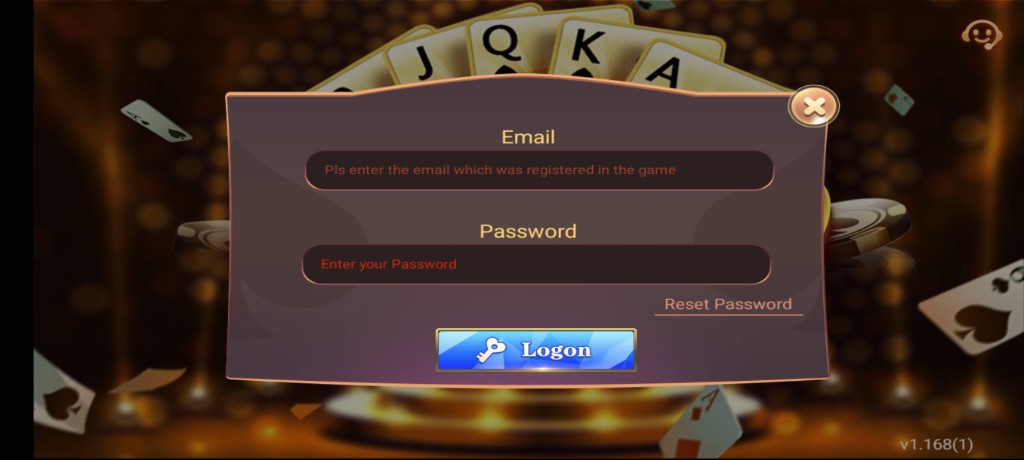
Email password login is the primary method recommended for Pakistani players who want long-term access. The flow is simple once you know where each control sits on the gold and burgundy login panel.
- Launch the app. Wait for the splash art and version strip. Confirm you are on a current build near v1.168 rather than an abandoned fork.
- Tap Login. Skip guest if you already own an account. Guest creates a temporary profile that is harder to merge later if you forget binding.
- Enter email. Type the address exactly as registered. Prefer Gmail or another inbox you can open on the same phone for OTP recovery.
- Enter password. Watch for hidden spaces at the end. Use show-password if available so you can verify characters without guessing.
- Solve captcha if shown. Captcha protects against credential stuffing. Complete it carefully; multiple failures can cool down the form.
- Confirm Login. On success you land in the lobby with chip balance, shop icon, and profile avatar visible.
- Optional: stay signed in. If the build offers remember-me, enable it only on your personal phone, never on a borrowed device.
After the first successful 3 Patti World login, open Profile and screenshot your user ID. That ID helps support if you later face deposit mismatches or need to prove ownership during a device change.

What a healthy login response looks like
A healthy session loads the lobby within a few seconds, shows your nickname, and keeps the shop reachable. If the app returns you to the splash endlessly, force close, clear cache from Android settings, and retry. Persistent black screens after credentials are accepted usually mean a broken install rather than a wrong password — reinstall from the official download path and try again.
Guest play to permanent account binding
Many Pakistani beginners tap Guest to explore Teen Patti tables quickly. That is fine for learning card flow, but dangerous for money. Binding converts the temporary profile into a recoverable identity.
- Open Profile or Settings from the lobby.
- Choose Bind Account, Link Email, or similar wording.
- Enter a fresh email you control and invent a strong unique password.
- Request OTP, open the inbox, and paste the code before it expires.
- Save binding and immediately log out, then log back in with email to verify.
Do not wait until you win a big pot. Bind while the balance is still small so you discover OTP delays early. After binding, guest login should no longer be your daily path. Always use the email method going forward. If the bind button is missing, update to v1.168 and reopen Profile; older APKs sometimes hide binding behind incomplete menus.
Binding before your first deposit is the safest sequence. JazzCash and EasyPaisa top-ups should land on an account you can reopen tomorrow.
Password reset and account recovery
Forgot password is the lifeline when auto-fill fails or you changed devices. Treat reset as a controlled process, not a spam of OTP taps.
- On the login screen, tap Forgot Password or Reset.
- Enter the bound email and request a verification code (see Forget Password screen below).
- Open Gmail or your provider app; check Primary, Promotions, and Spam.
- Return to 3 Patti World and type the OTP within the countdown.
- Create a new password with mixed case, numbers, and a symbol if allowed.
- Confirm the new password, then log in fresh without relying on old auto-fill.
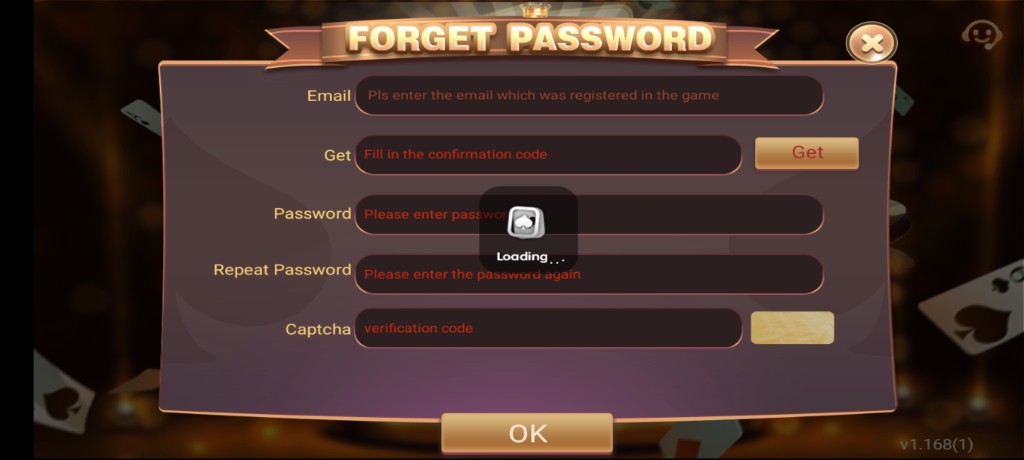
If the OTP never arrives, wait out the cooldown instead of hammering Resend. Rapid requests can flag the mailbox channel. Switch networks once, confirm the email spelling with a written note, and try again. Still stuck? Visit the problems hub for broader connection fixes, then retry reset during off-peak evening hours when inboxes are less delayed.
Recovering after a phone change
Buy a new Android phone, install the trusted APK, and log in with the same email password pair. Do not create a second registration hoping to merge balances later — duplicate accounts split your history and can void bonuses. If you only remember the phone number used for OTP but not the email, check SMS threads and email search for older 3 Patti World messages that reveal the address.
OTP, captcha, and network troubleshooting
OTP friction is the most reported 3 Patti World login complaint in Pakistan. Use this diagnostic table before assuming the account is banned.
| Symptom | Likely cause | Fix to try first |
|---|---|---|
| OTP email missing | Spam filter or typo | Check spam, resend once after cooldown |
| OTP expired | Slow inbox sync | Request a fresh code and paste immediately |
| Captcha loop | Unstable network | Switch Wi-Fi/data, reload login |
| Incorrect password | Keyboard or spaces | Retype manually, then reset |
| Login button hangs | Server or APK lag | Force close, retry on 4G, update APK |
| Kicked after success | Dual device session | Close app on second phone |
Also confirm the phone clock is set to automatic network time. Wrong device clocks can invalidate short-lived OTP tokens. Airplane mode toggles for ten seconds can refresh carrier DNS when Gmail will not sync.
Security tips tailored for Pakistani wallets
Login security is not only about passwords. It protects JazzCash and EasyPaisa activity tied to your chip shop. Follow these habits:
- Never share OTP codes in Facebook groups, Telegram channels, or agent chats claiming to “upgrade VIP.”
- Reject APKs from random Drive links; fake builds harvest credentials on the login form.
- Use a unique password that you do not reuse on banking apps.
- Log out on cafe or cousin phones immediately after playing.
- Keep screen lock enabled so notification OTP previews are not readable by others.
- After any suspicious login, change password and review recent shop purchases.
When friends ask to “just try your account,” decline. Shared logins cause bonus abuse flags and make withdrawals harder to defend. If you mentor a new player, send them the download app page and let them register their own email.
Device hygiene after login
Clear unused clones of the game. Multiple package names on one phone confuse players about which login is real. Keep one official install, pin it to your home screen, and ignore lookalike icons. Update Android WebView and Chrome components because some captcha widgets depend on them.
Mistakes that lock players out
Avoid these patterns that generate most lockouts:
- Creating a second account because login failed once, then depositing into the empty one.
- Binding a temporary college email that expires after graduation.
- Saving passwords only inside an old phone that later dies with no backup.
- Typing passwords while a password manager fills a different site’s credentials.
- Installing beta clones that accept login but cannot sync shop history.
- Ignoring version notes and staying on broken builds that reject modern OTP flows.
If you already made one of these mistakes, stop depositing. Secure the email you still control, reset the password, confirm lobby chips, and only then continue play. For gameplay questions after you are inside, read how to play. For earning side bonuses after a stable login, see refer bonus.
Login methods comparison
| Method | Best for | Risk level | Pakistan tip |
|---|---|---|---|
| Email + password | Daily play, deposits | Low when secured | Primary recommendation |
| Guest | Short trial only | High if unpaid chips grow | Bind before JazzCash top-up |
| Forgot password | Recovery | Medium during OTP delay | Use stable 4G and check spam |
| Reinstall + login | Broken APK recovery | Low with bound email | Use trusted apk-download link |
After login: sensible next actions
Once the lobby loads, resist diving into the highest stake table immediately. Confirm your chip balance, open the shop once without paying to see payment labels, and skim any event banners. If you plan to add funds, follow the deposit page carefully so A-Pay, JazzCash, or EasyPaisa matches land on the correct user ID. If you prefer free progress first, explore referral tasks, then return to cash tables when comfortable.
Keep this login page bookmarked. Each major APK bump can shift button labels slightly, but the principles stay constant: bound email, unique password, patient OTP handling, and rejection of fake agent links. Version v1.168 players who follow that checklist report far fewer lockouts than users who improvise every reinstall.
Finally, remember the age gate. 3 Patti World style real-money experiences are intended for adults. If you manage family phones, keep the APK off devices used by minors and protect your login so children cannot open cash tables by accident.
Pakistan city scenarios for smoother sign-in
Players in dense urban zones often share the same tower congestion during evening peak hours. If your 3 Patti World login stalls between 8 pm and 11 pm in Karachi or Lahore, try a short pause, toggle airplane mode, and authenticate again. Morning logins usually clear captcha and OTP mail faster. In smaller towns where 3G still appears during indoor use, step near a window or briefly enable Wi-Fi calling adjacent routers so the handset holds a steadier route to the login API.
Hostel and office networks sometimes block unfamiliar app domains. When the password is accepted but the lobby never appears, hot-spot from your Jazz or Telenor SIM and retry. That single network change solves a surprising number of “account wrong” tickets that were never credential problems at all. After you are inside, you can return to Wi-Fi for lighter lobby browsing, then switch back to mobile data before opening the shop.
Recording proof for support
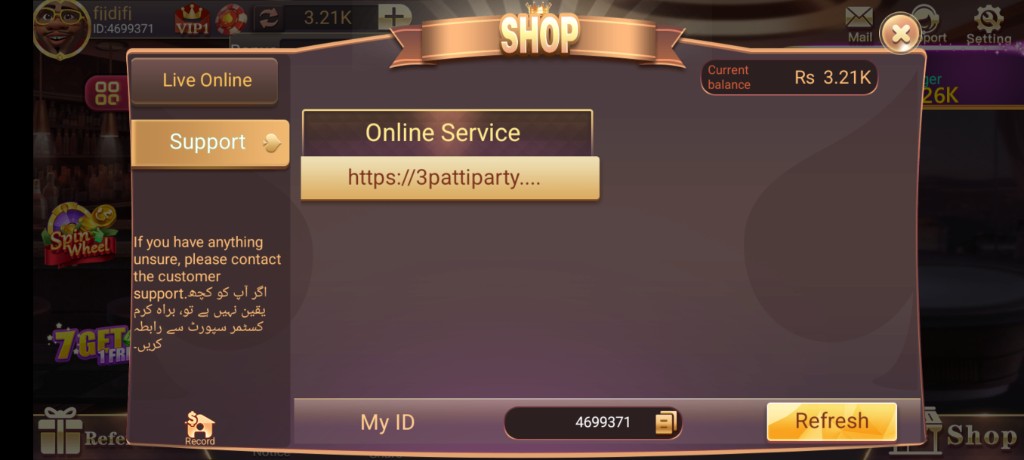
If you must contact support about a login failure, capture three screenshots: the error toast, your profile user ID from any previous successful session, and the APK version string. Do not send your password. Support should never ask for full wallet PINs either. Clear evidence shortens resolution time and protects you from social-engineering scripts that pretend to be official staff in third-party chats.
Store a printed or offline note with email, user ID, and the approximate registration month. Phones get lost; notes survive. Combine that note with the habits on this 3 Patti World login page and you will rarely lose access even after factory resets, ROM changes, or moving from an old Realme handset to a new Samsung device.
When friends recommend “agent login shortcuts,” ignore them. The only trustworthy sequence is official APK, personal email, personal password, and personal OTP inbox. Everything else increases theft risk. Stay patient through one clean login, then enjoy Teen Patti tables with the confidence that your chips will still be there tomorrow.
Ready to open your account?
Install the trusted APK, then log in with your bound email or create a fresh registration first.
3 Patti World Login FAQs
How do I log in to 3 Patti World in Pakistan?
Open the official APK, tap Login, enter your registered email and password, complete any captcha, and confirm. Use the latest v1.168 build and a stable network for the cleanest result.
What if I forgot my 3 Patti World password?
Tap Forgot Password, enter the bound email, request OTP, check inbox and spam, then set a new strong password and log in again without old auto-fill values.
Can I convert a guest account into a permanent login?
Yes. Use Bind Account in Profile, add email and password, verify OTP, then test a full logout and email login cycle before depositing.
Why is my OTP for 3 Patti World login not arriving?
Typo’d emails, spam filters, cooldown locks, and weak networks are common causes. Wait the timer, switch Wi-Fi/data, and resend once.
Is guest login safe for deposits and withdrawals?
No. Guest mode is for trial play. Bind email before JazzCash or EasyPaisa deposits so recovery and withdrawals remain possible.
Which version should I use for a stable login?
Prefer the current Pakistan-ready APK noted as v1.168 from the official apk download page rather than random mirrored files.
Why does the app say incorrect password when I am sure it is right?
Hidden spaces, keyboard language changes, or stale auto-fill often cause this. Retype carefully or reset the password.
Can I stay logged in on two Android phones?
Installations on two phones are possible, but concurrent sessions may disconnect one device. Keep deposits on a single primary phone.
What should I do if login works but the lobby will not load?
Force close, switch networks, verify permissions, and reinstall from the trusted source if needed, then sign in with the same bound email.